How Long Can a YouTube Short Be? Full Specs, Safe Zones, and Why Yours Isn't in the Feed
YouTube Shorts can be up to 3 minutes in 2026. Get the full specs — resolution, aspect ratio, safe zones, and why your vertical video might not appear in the Shorts feed.
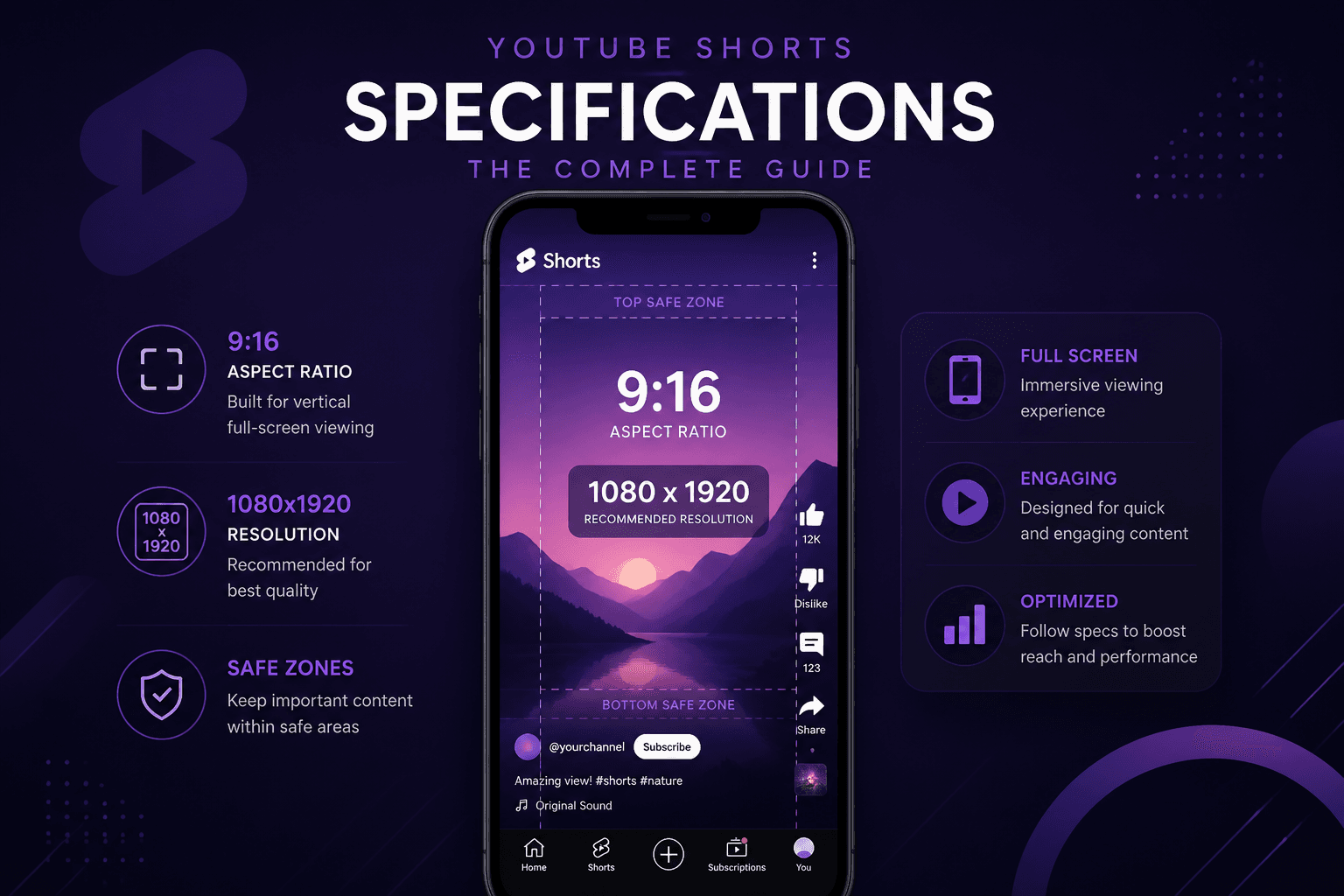
A YouTube Short can be up to three minutes — 180 seconds. That limit replaced the original 60-second cap on 15 October 2024, and a surprising number of guides still quote the old figure.
Length isn't the only thing that decides whether YouTube treats your upload as a Short. Here are the full specifications, the layout constraints, and the reasons a video that meets the length rule still ends up outside the Shorts feed.
The specifications
| Spec | Value |
|---|---|
| Maximum length | 3 minutes (180 seconds) |
| Minimum length | None |
| Resolution | 1080 × 1920 recommended |
| Aspect ratio | 9:16 vertical (1:1 square also qualifies) |
| Frame rate | 30 fps typical, up to 60 fps |
| Container / codec | MP4, H.264 video, AAC audio |
| Maximum file size | 256 GB |
| Minimum sensible resolution | 720 × 1280 |
1080p is the ceiling
You can upload a Short at 4K. Viewers will never see it.
YouTube serves Shorts at a maximum of 1080 × 1920 regardless of source resolution. Uploading at 2160 × 3840 increases your export time and upload duration with no benefit visible to anyone watching.
The only argument for uploading above 1080p is the same one that applies to thumbnails: giving the encoder a higher-quality source to downscale from can produce marginally cleaner output. It's a small effect and rarely worth the extra upload time on a mobile connection.
The practical takeaway: set your editing project to 1080 × 1920 and export at that size.
It also means no downloader can produce a 4K Short — the file simply isn't stored at that resolution.
Why your video isn't showing as a Short
Three causes account for nearly all of it.
Wrong aspect ratio. A 16:9 horizontal video gets published as a regular video no matter how short it is. Vertical 9:16 and square 1:1 qualify; horizontal doesn't. Cropping a landscape video to vertical works mechanically, but it always looks worse than shooting or composing vertically from the start — you lose the sides of every frame, and any framing decisions made for a wide shot fall apart.
Over three minutes. A 3:05 video uploads fine and appears as a standard video.
Classification delay or flag. Occasionally YouTube's classifier takes time, or something in the video triggers a review. If everything else is correct and it still isn't in the feed after a few hours, adding `#Shorts` to the title or description can help — it's no longer required but still acts as a signal.
Safe zones
The Shorts interface covers a meaningful portion of your frame. On a 1080 × 1920 canvas:
- Bottom — roughly 250 to 390 pixels are covered by the title, channel handle, and description
- Right side — roughly 60 to 100 pixels hold the like, comment, and share buttons
- Top — around 100 to 180 pixels can be obscured depending on device
The reliable approach is to keep everything essential — faces, text, product shots — within a central area of roughly 900 × 1350. Anything outside that risks being covered on some device.
This catches people out most often with captions burned into the bottom of the frame, which is the standard position in landscape video and exactly where the Shorts title sits.
Shorts against TikTok and Reels
If you publish to more than one platform, the specs are close enough that a single export usually works. The differences that matter:
| Shorts | TikTok | Reels | |
|---|---|---|---|
| Max length | 3 min | 10 min | 90 sec (most accounts) |
| Resolution | 1080 × 1920 | 1080 × 1920 | 1080 × 1920 |
| Max file size | 256 GB | ~288 MB mobile | 1 GB |
For content in the two-to-three-minute range, Shorts is the only one of the three short-form feeds that takes it natively.
The much larger practical difference is file size. TikTok's mobile cap means heavy compression on longer or higher-bitrate exports; Shorts effectively has no limit, so your upload arrives at YouTube in better condition before their encoder touches it.
The audio licensing trap when cross-posting
This is the mistake that costs people the most, and it isn't a spec issue.
Music from YouTube's Shorts audio library is licensed for use on YouTube. That licence does not travel with the file. Download your own Short, upload it to TikTok or Reels, and you've published commercially licensed music outside its licensed context. Depending on the track, that means muted audio, a takedown, or a copyright strike on the receiving platform.
The same applies in reverse — TikTok sounds reposted to Reels get flagged for the same reason.
If you cross-post, either keep a version with your own audio or independently licensed music, or upload the video silent and add each platform's native audio in their own editor.
Length in practice
The three-minute ceiling is a limit, not a target. Completion rate is heavily weighted in short-form distribution, and a viewer who leaves at 40 seconds of a three-minute video signals something different to one who watches a 40-second video to the end.
Most analyses of high-performing Shorts land in the 15 to 60 second range. That isn't a rule — some formats genuinely need two minutes — but it does mean the extended limit is best understood as permission for the content that needs it rather than an invitation to stretch.
If your Short is running long, the useful question is whether the first three seconds still earn the next three. Retention data in YouTube Analytics shows exactly where people leave.
Downloading your own Shorts
If you need a clean file for cross-posting or archiving, our Shorts downloader returns the MP4 without the interface overlay that screen recording captures, and without adding a watermark. Note the audio licensing point above before you repost anywhere else.
Common questions
Can I make a Short longer than three minutes?
No. Anything longer publishes as a standard video. Split it or accept the long-form format.
Do Shorts need to be exactly 9:16?
9:16 is ideal. Square 1:1 also qualifies but leaves empty space on a phone screen. Horizontal doesn't qualify at all.
Can I turn an existing video into a Short?
Not by changing its settings. You'd need to re-edit to vertical and upload as a new video.
Does adding #Shorts still matter?
It's no longer required for classification, but it remains a useful signal and costs nothing.
Can I add a custom thumbnail?
Availability depends on eligibility and has been rolling out gradually. Where it isn't available, YouTube uses a frame you select at upload — and that choice is permanent.